
MewTools installs the drivers for your card, MAKCU and FERRUM. It gets each one directly from the maker's site, FTDI, WCH or Silicon Labs, and checks the file's signature before it runs it. They all go on your second PC, and nothing gets installed on your main PC.
If you're new to MewTools, Getting started with MewTools goes through the whole setup in order.
Install them
- Open Drivers. A green dot means the driver is in, a red one means it's missing.
- Press Install (1) next to each red one. It downloads and installs by itself.
- Press Check again and the dot goes green.
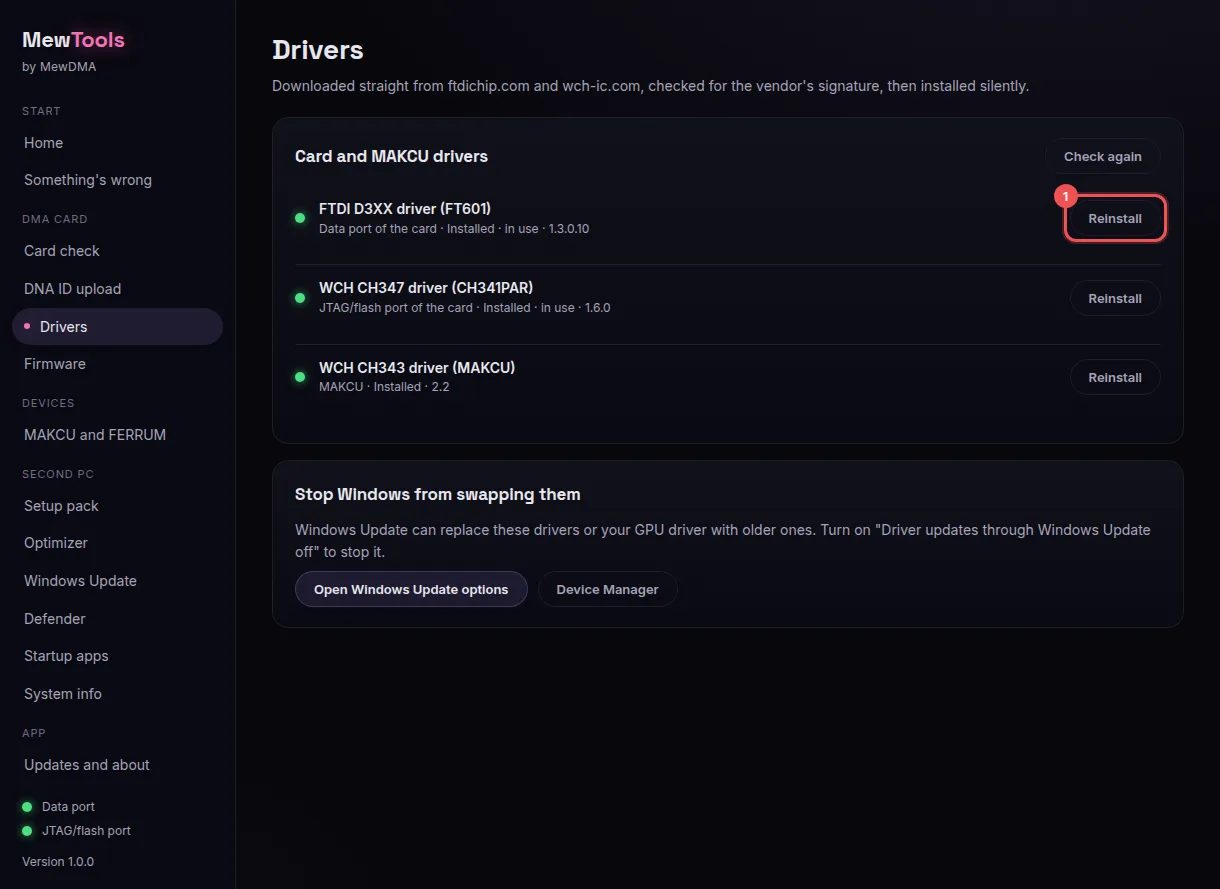
Once a driver is in, the button says Reinstall. You only need that to fix a driver that's acting up.
Use the buttons in MewTools. Don't wait for Windows to find a driver, and don't get one from a driver download site.
Which driver is which
- Data port driver (FTDI FT601).
The card's data port. Your software and the speed test use it every day. - JTAG port driver (CH347).
The card's JTAG/flash port on newer cards. You need it to read your DNA ID and to flash. - MAKCU driver (CH343).
MAKCU's COM port. Skip it if you don't have a MAKCU. - FERRUM driver (Silicon Labs CP210x).
FERRUM's COM port. Skip it if you don't have a FERRUM.
An amber dot on MAKCU driver (CH343) means the driver is in, and MewTools tells you to plug MAKCU's USB2 port into this PC.
Stop Windows from swapping them
Windows Update can put older drivers over the ones you installed, and then the card or MAKCU stops working right. MewTools warns you about it with MT-208.
At the bottom of the Drivers screen, turn on Stop Windows swapping your drivers. While it's on, Windows Update won't swap your FTDI, CH347, CH343, CP210x or GPU driver for an older one, and security updates still come through. You can also open Windows Update in the menu and turn on Stop Windows Update from changing drivers. Using the Windows Update and Defender pages explains every switch on that screen.
35T cards with an FTDI JTAG port
Some 35T cards use an FTDI chip called Quad RS232-HS for the JTAG/flash port, not a CH347. The flasher can't talk to that port on its normal driver, so it needs WinUSB.
MT-210 has the same steps, plus how to do it with Zadig.
If a driver won't install
- The download failed.
Check your internet and try again in a minute. If the maker's site is down, MewTools uses our backup copy of the same file, checked the same way (MT-209). - A dot stays red after the install.
Unplug that cable from the second PC, plug it back in and press Check again. - Device Manager still shows a warning on the data port.
Another driver got there first. What Device Manager shows has the fix.
Every driver code, MT-201 to MT-211, is in MewTools driver errors.
You don't need an account, this tells us what to write more of.