
Some tools only open COM1 to COM9. If your MAKCU or your card shows up as COM10, COM14 or higher, move it to a free number below 10. You only do this once per device.
MewTools tells you when it spots one. The MAKCU and FERRUM screen shows MT-403, and Something's wrong checks that every COM port is below 10.

Move it below 10
Right-click the Start button and open Device Manager. The red numbers in the picture below match the steps.
- Open Ports (COM & LPT) and find your device (1). MAKCU shows as USB-Enhanced-SERIAL CH343, and the card's JTAG port is a CH347. Right-click it and choose Properties.
- Open the Port Settings tab (2).
- Press Advanced (3).
- Under COM Port Number (4), pick a free number below 10, like COM3 or COM4.
Press OK in both windows, then unplug the device and plug it back in. It shows the new number now.
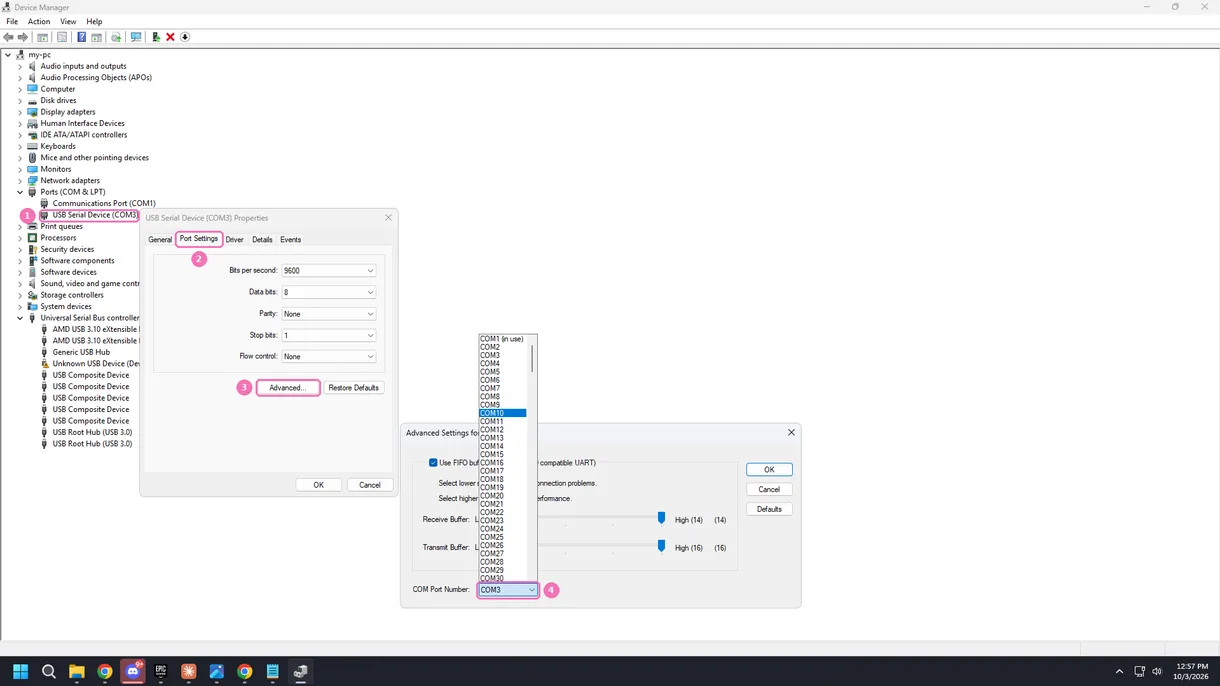

Windows says the number is in use? Pick another low number. If every low one is taken, you can usually take one marked in use anyway, because it's mostly an old device that isn't plugged in anymore.
Then pick it again
- In MewTools.
Open MAKCU and FERRUM again, or press Find devices. Your device shows under the new number, so pick it and carry on. - In your software.
Set the new number there too, because it doesn't change by itself.
Keep it below 10
- Plug MAKCU into the same USB port every time, so Windows keeps giving it the same number.
- If you swap ports a lot, it can get a high number again. Just do the steps above again.
Wiring and the rest of MAKCU's port setup is in MAKCU setup. Other MAKCU and FERRUM codes are in MAKCU and FERRUM errors.
You don't need an account, this tells us what to write more of.