
You do this on your second PC, in the Ferrum Utility. Nothing goes on your main PC.
Updates come through the Ferrum Utility. If an update has new firmware for FERRUM, the Utility puts it on every board that's plugged in, so keep FERRUM connected to the second PC while you update.
Don't have the Utility yet, or it won't open? Get it with FERRUM's setup tool from mewdma.net/downloads/ferrum-bootstrapper.exe and run it on the second PC. It's FERRUM's own tool, and Windows may show a SmartScreen warning because it isn't code signed. Click More info, then Run anyway. After that, every update happens inside the Utility.
Update it
- Open the Misc tab. The update row is at the bottom.
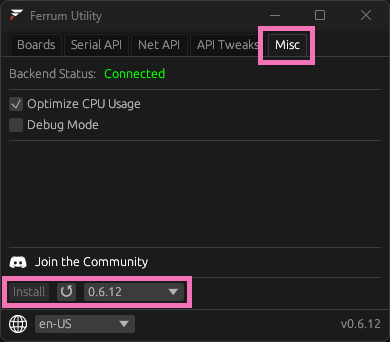
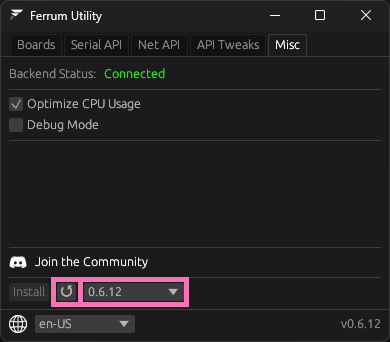
- Click the refresh button or the version list, so it checks for new versions. Click the list to see every version.
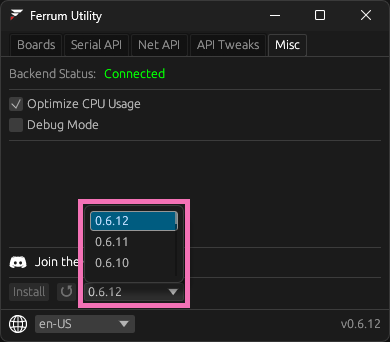
- Pick the newest version, it's picked by default.
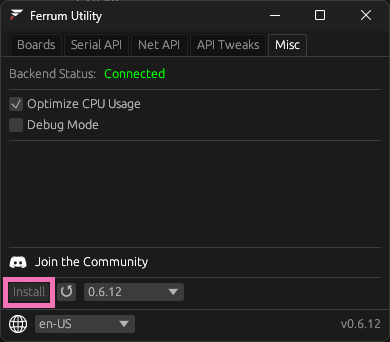
- Click Install. If Install is greyed out, you're already on that version and there's nothing to do.
If FERRUM was unplugged
A board that wasn't plugged in during the update keeps its old firmware. It can still be updated by hand from the Utility. Plug it into the second PC and open a ticket in our Discord (how to open one), and we'll walk you through it.
Stay on the latest
FERRUM's developer says to always run the latest version, because it has the newest security and humanization fixes. If something breaks after an update, tell us in a ticket and we'll get it reported. Going back to an older version is in Rolling back FERRUM, but only do that if we ask you to.
You don't need an account, this tells us what to write more of.