
Everything here happens on your second PC. That's where your software and the Ferrum Utility run.
FERRUM talks to your software two ways. Some software uses a COM port and some uses a network address, which the Utility calls Net. The Utility gives you both, so use whichever your software asks for. If it asks for a COM port, use the COM port. If it asks for an IP address, use Net.
Do FERRUM setup first, so the driver and the Utility are in and your board shows up.
Which one your software needs
- COM port.
Software made for KMBox B+ Pro or MAKCU. FERRUM also has a few commands of its own here. - Net.
Software made for KMBox Net or DHZBox.
FERRUM only does some of MAKCU's commands, so if your software is made for MAKCU only, ask your provider if it works with FERRUM. If your software supports none of these, it won't work with FERRUM.
Using the COM port
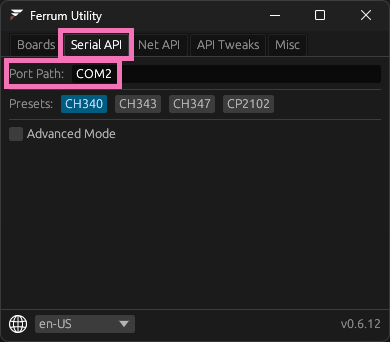
- Open the Ferrum Utility and go to the Serial API tab.
- Note the Port Path, like COM2.
- In your software, pick that same port.
- The baud rate doesn't matter.
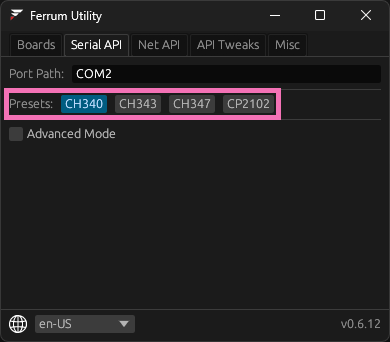
FERRUM's virtual port takes any baud rate, so leave whatever your software has, 115200, 4000000 or anything else. - Some software finds the port by itself.
It looks for a certain chip, like a CH340 or CH343. The Presets row sets which chip FERRUM shows up as. Your provider can tell you which one their software looks for. - Some software only opens low numbers,
like COM1 to COM3. Click the Port Path and type a new one, like COM3. If it jumps back to the old number, the new one is already taken, so try another.
Using Net
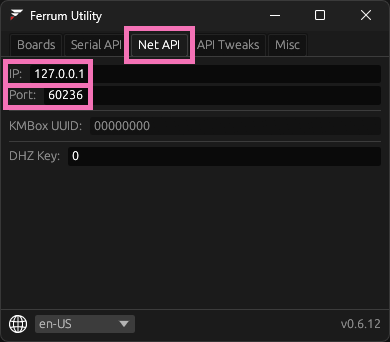
- Open the Net API tab.
- Copy the IP and Port, like 127.0.0.1 and 60236. The port can be different on your PC, so copy the one your Utility shows.
- Put them in your software as the IP address and port number.
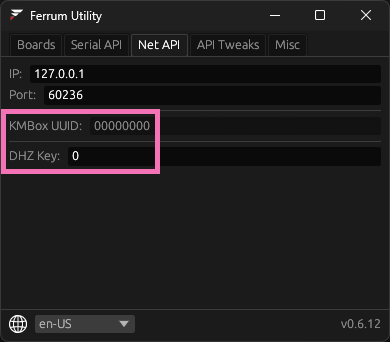
- DHZ Key.
Some DHZBox software scrambles what it sends with a key. DHZBox calls it RANDMACKey. If yours uses one, the key in your software has to match DHZ Key in the Utility. - KMBox UUID.
If your KMBox Net software asks for a UUID, any eight-digit hex value works, like 00000000.
Still won't connect
- Check the Misc tab says Backend Status: Connected.
- Close other tools that might have the COM port open. Only one program can use it at a time.
- More fixes are in FERRUM troubleshooting.
Did this help?
You don't need an account, this tells us what to write more of.